Send New Notification
Overview
The Send New Notification form is used by the admin to invite a company to participate in an audit. Once submitted, the selected company's users will receive an audit invitation notification.
Navigate to: Audit > Audit Planning > Audit Notification > New Notification
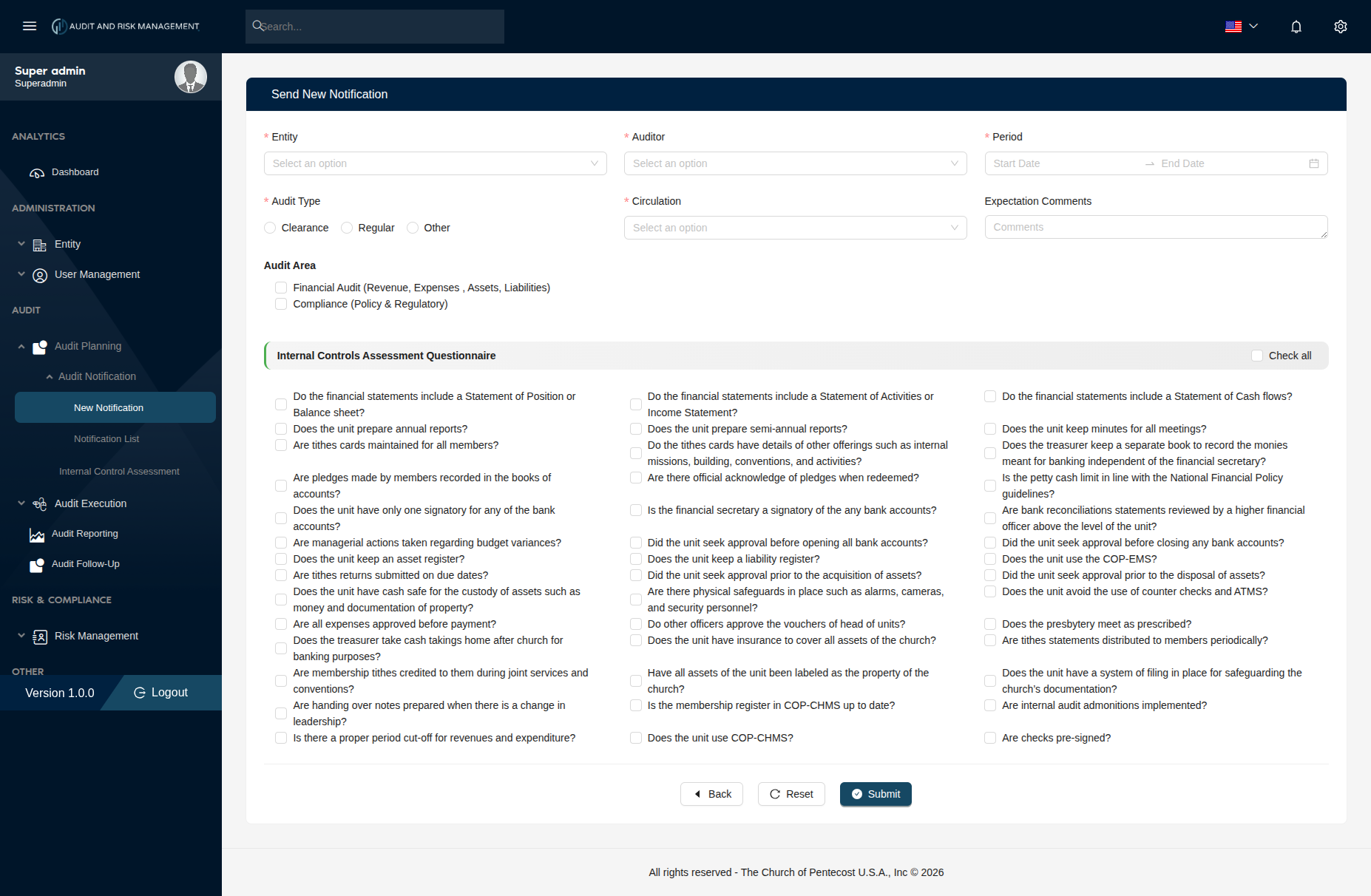
Form Fields
Basic Information
| Field | Type | Required | Description |
|---|---|---|---|
| Entity | Dropdown | ✅ | Select the company/entity to be audited. Pre-filled if accessed from the Company List. Comes from Entity → Company Information |
| Auditor | Dropdown | ✅ | Select the auditor responsible for this audit. Comes from User Management → User Information, whose role is Auditor Role |
| Period | Date Range | ✅ | Set the audit period — Start Date and End Date |
| Audit Type | Radio | ✅ | Select one: Clearance, Regular, or Other |
| Circulation | Dropdown | ✅ | Select the auditor responsible for this audit. Comes from User Management → User Information, whose role is not Auditor Role |
| Expectation Comments | Text | ❌ | Optional comments describing expectations for this audit |
Audit Area
Select the area(s) this audit will cover:
| Option | Description |
|---|---|
| Financial Audit (Revenue, Expenses, Assets, Liabilities) | Covers financial statements and accounts |
| Compliance (Policy & Regulatory) | Covers policy adherence and regulatory compliance |
!!! info "Multiple selections allowed" Both audit areas can be selected simultaneously if the audit covers both financial and compliance aspects.
Internal Controls Assessment Questionnaire
A checklist of internal control questions that the auditor will assess during the audit. Use the Check all toggle (top-right of the section) to select all questions at once, or check them individually.
The questions are organized across three columns and cover the following areas:
=== "Financial Statements & Reporting" - Do the financial statements include a Statement of Position or Balance sheet? - Do the financial statements include a Statement of Activities or Income Statement? - Do the financial statements include a Statement of Cash flows? - Does the unit prepare annual reports? - Does the unit prepare semi-annual reports? - Does the unit keep minutes for all meetings?
=== "Tithes, Pledges & Offerings" - Are tithes cards maintained for all members? - Do the tithes cards have details of other offerings such as internal missions, building, conventions, and activities? - Are pledges made by members recorded in the books of accounts? - Are there official acknowledge of pledges when redeemed? - Are tithes returns submitted on due dates? - Are membership tithes credited to them during joint services and conventions? - Are tithes statements distributed to members periodically?
=== "Banking & Financial Controls" - Does the treasurer keep a separate book to record the monies meant for banking independent of the financial secretary? - Does the unit have only one signatory for any of the bank accounts? - Is the financial secretary a signatory of the any bank accounts? - Are bank reconciliations statements reviewed by a higher financial officer above the level of the unit? - Did the unit seek approval before opening all bank accounts? - Did the unit seek approval before closing any bank accounts? - Does the treasurer take cash takings home after church for banking purposes? - Is the petty cash limit in line with the National Financial Policy guidelines?
=== "Assets & Expenditure" - Does the unit keep an asset register? - Did the unit seek approval prior to the acquisition of assets? - Did the unit seek approval prior to the disposal of assets? - Are managerial actions taken regarding budget variances? - Does the unit keep a liability register? - Does the unit have cash safe for the custody of assets such as money and documentation of property? - Are physical safeguards in place such as alarms, cameras, and security personnel? - Does the unit use the COP-EMS? - Does the unit avoid the use of counter checks and ATMS? - Are all expenses approved before payment? - Do other officers approve the vouchers of head of units? - Does the unit have insurance to cover all assets of the church? - Have all assets of the unit been labeled as the property of the church?
=== "Governance & Compliance" - Are handing over notes prepared when there is a change in leadership? - Is there a proper period cut-off for revenues and expenditure? - Does the presbytery meet as prescribed? - Does the unit have a system of filing in place for safeguarding the church's documentation? - Are internal audit admonitions implemented? - Are checks pre-signed? - Is the membership register in COP-CHMS up to date? - Does the unit use COP-CHMS?
!!! tip "Check All" Click the Check all button at the top-right of the questionnaire section to select all questions at once. Click again to deselect all.
Step-by-Step: How to Send an Audit Notification
- Go to Audit → Audit Planning → Send New Notification (or click Invite For Audit from the Company List page)
- Select the Entity (company) to be audited
- Select the Auditor responsible for the audit
- Set the Period — pick a Start Date and End Date
- Select the Audit Type:
Clearance,Regular, orOther - Select the Circulation scope
- Optionally add Expectation Comments
- Under Audit Area, check the relevant area(s):
- Financial Audit and/or Compliance
- Under Internal Controls Assessment Questionnaire, select the applicable questions
- Use Check all to select all questions at once
- Click Submit to send the notification
!!! success "Expected Result" The selected company's users receive an audit invitation notification. The audit entry appears in Audit → Audit Planning with the configured details.
!!! tip "Buttons" - Back — Returns to the previous page without saving - Reset — Clears all fields and unchecks all selections - Submit — Sends the notification and creates the audit record